Go 1.22+

Explore and serve your
SQLite databases.

EasyDB is a small, fast, self-contained Go binary that serves SQLite databases over a REST API and lets you explore SQLite databases using a simple browser UI. Auto-generated CRUD endpoints, scheduled backups, raw SQL, and a browser UI.

Get started → API reference
bash
# build
$ go build -o easydb ./cmd/easydb/
$ ./easydb --db mydata.db

EasyDB  http://127.0.0.1:8000
admin → /admin/
db    → mydata.db 
bash
# query any table instantly
$ curl -H "X-API-Key: $KEY" \
  localhost:8000/api/databases/\
mydata/tables/users/rows

{"rows":[{"id":1,"name":"Alice"}],
 "total":1,"limit":50,"offset":0}

Built-in admin UI

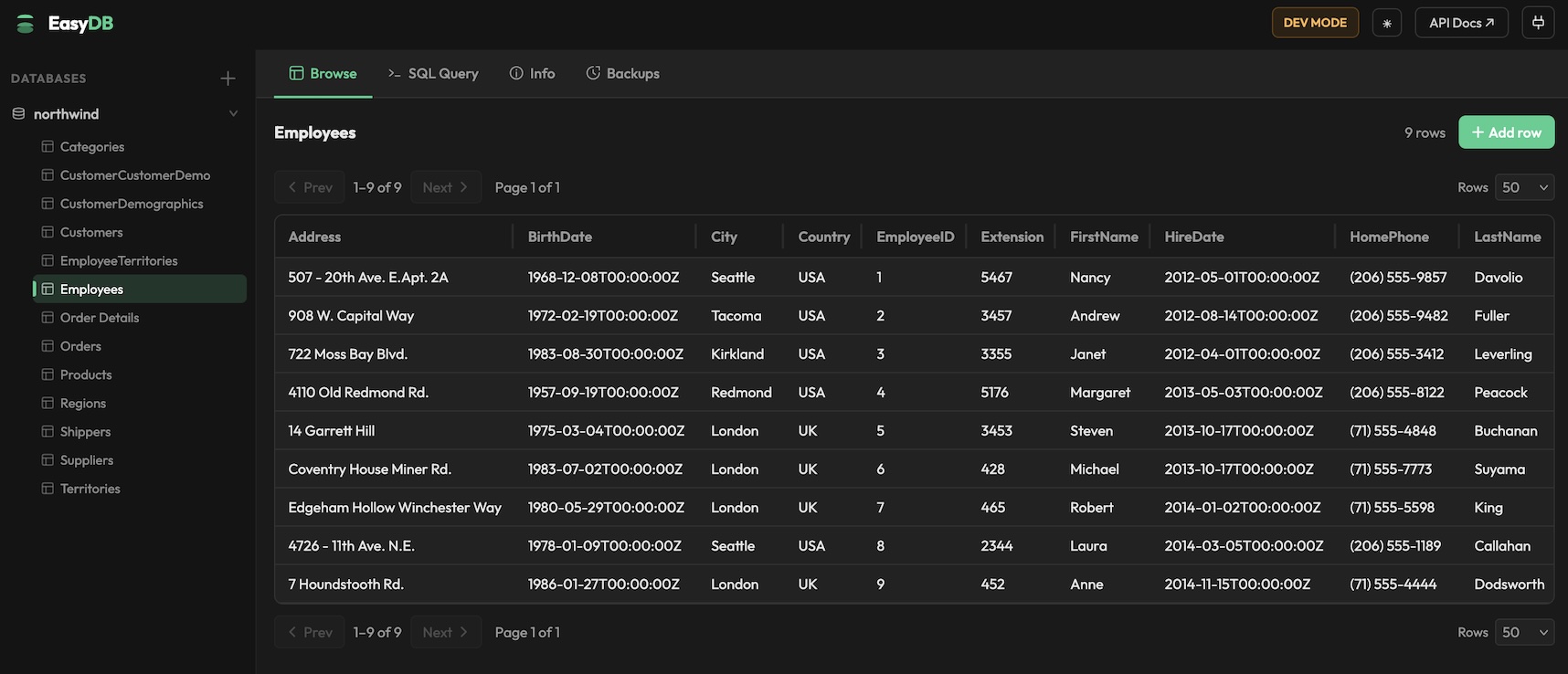
Whether you're digging through a local database or running EasyDB as a service, the admin UI is always there. Browse tables, edit rows, run SQL with syntax highlighting, and manage backups — all without leaving the browser.

localhost:8000/admin/
EasyDB admin UI showing a table browser with employee data
Table browser
Paginated, sortable view of any table. Insert, edit, and delete rows without writing SQL.
SQL editor
Write and run ad-hoc queries in the browser with syntax highlighting and instant results.
Auto CRUD endpoints
Every table gets GET, POST, PUT, and DELETE endpoints automatically. No code required.
Raw SQL over HTTP
POST parameterised queries from your app. Works alongside the CRUD endpoints.
Multi-database
Register multiple SQLite files and switch between them in the UI or via the API.
Backups
On-demand or scheduled snapshots via VACUUM INTO. Auto-rotation, one-click restore.

Build from source.

Requires Go 1.22+. No other runtime dependencies — the SQLite driver is compiled in.

shell
# clone and build
git clone https://github.com/huyng/easydb
cd easydb
go build -o easydb ./cmd/easydb/

# optional: install to PATH
mv easydb /usr/local/bin/

# start with a database pre-registered
easydb --db ./mydata.db
Admin UI and OpenAPI docs are embedded in the binary. Open http://localhost:8000/admin/ and /docs/api once running.

Everything you need.

All endpoints require an X-API-Key header when EASYDB_API_KEYS is set. Responses are JSON.

Databases

endpoints
GET /api/databases list all registered
POST /api/databases register by name or path
POST /api/databases/upload upload a .db file
POST /api/databases/import import from URL
DELETE /api/databases/{db} unregister
GET /api/databases/{db}/info version, journal mode, size…

Tables & Rows

endpoints
GET /api/databases/{db}/tables list tables + schema + row counts
GET /api/databases/{db}/tables/{table}/schema column list
GET /api/databases/{db}/tables/{table}/ddl CREATE TABLE statement
GET /api/databases/{db}/tables/{table}/rows list rows (paginated)
POST /api/databases/{db}/tables/{table}/rows insert
GET /api/databases/{db}/tables/{table}/rows/{id} get by PK
PUT /api/databases/{db}/tables/{table}/rows/{id} update (partial)
DELETE /api/databases/{db}/tables/{table}/rows/{id} delete
insert a row
curl -X POST \
  -H "X-API-Key: $KEY" \
  -H "Content-Type: application/json" \
  -d '{"name":"Alice","age":30}' \
  localhost:8000/api/databases/\
mydb/tables/users/rows
list rows with pagination
curl -H "X-API-Key: $KEY" \
  "localhost:8000/api/databases/mydb/\
tables/users/rows\
?limit=25&offset=50\
&order_by=created_at&order_dir=DESC"

Raw SQL

SELECT
curl -X POST \
  -H "X-API-Key: $KEY" \
  -H "Content-Type: application/json" \
  -d '{"sql":"SELECT * FROM users WHERE age > ?","params":[18]}' \
  localhost:8000/api/databases/mydb/query
response
{
  "columns": ["id", "name", "age"],
  "rows": [[1, "Alice", 30]],
  "truncated": false
}
// DML/DDL returns rowcount + lastrowid
// SELECT capped at 10 000 rows

Backups

endpoints
POST /api/databases/{db}/backup create snapshot
GET /api/databases/{db}/backups list (newest first)
GET /api/databases/{db}/backups/{filename} download file
POST /api/databases/{db}/backups/{filename}/restore restore
DELETE /api/databases/{db}/backups/{filename} delete
POST /api/databases/backup-all snapshot all databases
Backups use VACUUM INTO — a consistent online snapshot that doesn't block reads or writes. Set EASYDB_BACKUP_SCHEDULE=6h (or 30m, 1d) for automatic snapshots. Oldest backups are deleted when EASYDB_BACKUP_MAX_COUNT is exceeded.

All via environment variables.

CLI flags override env vars. No config file required.

VariableDefaultDescription
EASYDB_API_KEYS—Comma-separated keys. Unset = open-access mode (no auth).
EASYDB_DATA_DIRdataRoot dir for databases and registry.
EASYDB_HOST127.0.0.1Bind address.
EASYDB_PORT8000Port number.
EASYDB_ADMIN_ENABLEDtrueSet false to disable the admin UI.
EASYDB_CORS_ORIGINS*Comma-separated allowed origins.
EASYDB_BACKUP_DIRdata/backupsWhere backup files are stored.
EASYDB_BACKUP_MAX_COUNT5Max backups per database before rotation.
EASYDB_BACKUP_SCHEDULE—Auto-backup interval: 30s · 5m · 6h · 1d
EASYDB_OPEN—SQLite file to register on startup (same as --db).
EASYDB_S3_BUCKET—S3 bucket name. Setting this switches the backup backend from local filesystem to S3.
EASYDB_S3_PREFIXeasydb-backups/Key prefix for objects stored in the bucket.
EASYDB_S3_REGIONus-east-1AWS region.
EASYDB_S3_ENDPOINT—Custom endpoint for S3-compatible services (MinIO, Cloudflare R2, etc.).
CLI flags
--db         string   register a SQLite file on startup
--host       string   bind address        (overrides EASYDB_HOST)
--port       string   port number          (overrides EASYDB_PORT)
--data-dir   string   data directory       (overrides EASYDB_DATA_DIR)
EasyDB